

CaffeineTimer
A native menu-bar timer that does one thing well, in about 1 MB. Pick a duration (15, 30, 60 or 120 minutes, indefinite, or a custom length you can set by simply dragging your mouse from the timer across your screen), watch the live countdown, get a notification when it ends, and your Mac sleeps on its own. A modern alternative to Amphetamine and the original Caffeine.
About 1 MB. All native.
100% Apple Silicon native: no Intel fat, no universal-binary bloat, no bundled update framework. Up to 15× smaller than the popular alternatives.
See it on your screen.
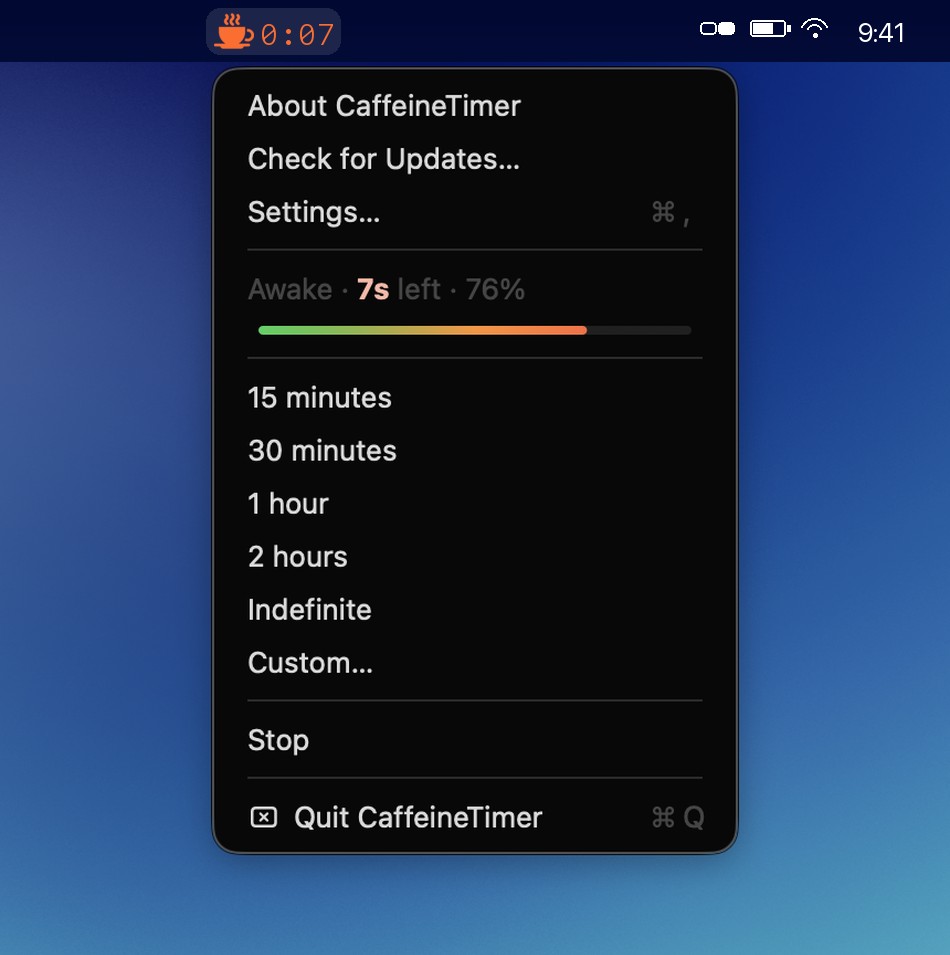
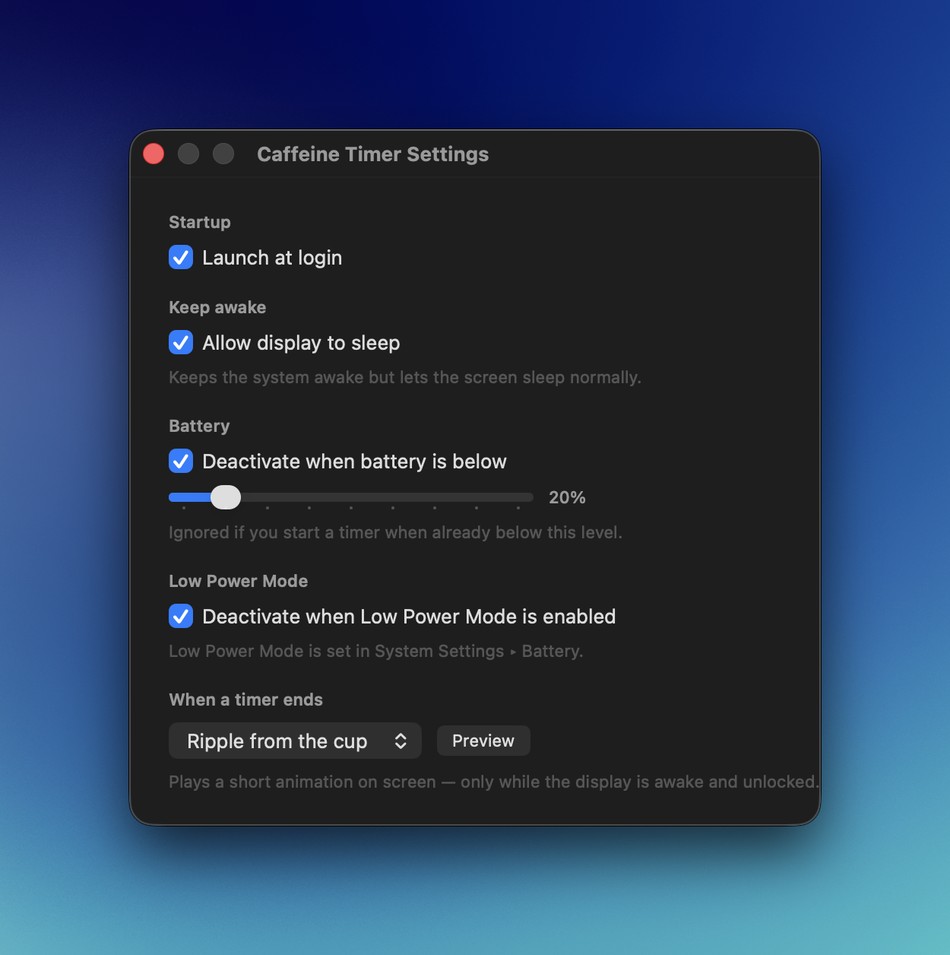
A live countdown and progress bar right in the menu bar, plus a Settings window with launch-at-login, battery-smart guards, and a timer-end flourish.
Everything you need, nothing you don't.
One job, done cleanly. Click the cup, pick how long, and forget about it: CaffeineTimer releases the hold on its own when the time is up.
Pick a duration
A small menu with 15, 30, 60 and 120 minutes, plus indefinitely. One click and you're done: no fields to fill in.
Drag your mouse to set time
Pick Custom (or just hold ⌥ Option and drag straight from the cup icon) and stretch your mouse across the screen; the further you drag, the more time gets added. It draws a fun, glowing blue-and-orange band as you go. Hold Shift for hours, Option for seconds.
A countdown you can actually read
A live progress bar and timer glide green → orange → red as the session winds down: time remaining and % left at a glance.
The cup turns red
Idle, the cup is a plain outline. While a timer runs it tints red: an at-a-glance signal your Mac is being held awake.
A notification when time's up
You get a confirmation when a timer starts and another the moment it expires, with a quiet beep fallback if notifications are off.
End with a flourish
When a timer ends, an optional celebration plays: a ripple from the cup, a screen-edge glow, confetti, or a curl of coffee steam. Off by default; switch it on in Settings and tap Preview. Polite by design: it never steals focus or clicks, never wakes a sleeping display, and skips the lock screen and fullscreen apps.
Checks for its own updates
A Check for Updates… item (and a button in the new About window) asks GitHub for the latest release and offers a one-click download or brew command. No Sparkle, no bundled updater.
Apple's own power assertion
It uses the exact IOKit assertion the built-in caffeinate tool uses: the macOS-native way to prevent sleep.
Let the display sleep
Switch on Allow display to sleep to keep your Mac awake while the screen turns off on its own. It saves power on a long download or render, without leaving it lit.
No daemon, no helper
No background process, no login item, no launch agent. The whole app is the menu-bar cup, and only while it's running.
No dependencies
AppKit, IOKit and UserNotifications only: Apple's own frameworks. No third-party libraries baked in.
No telemetry
No accounts, no analytics, no phone-home. It can't track you because there's nothing in it to do the tracking.
Four steps and you're awake.
Click the coffee cup
CaffeineTimer lives only in the menu bar: no Dock icon, no window. Click the cup to open its menu.
Choose how long
Pick 15, 30, 60 or 120 minutes, or indefinitely. A power assertion starts and a notification confirms the timer is running.
Watch it count down
The cup turns red and the time remaining ticks in the menu bar. Pick a new duration to replace the current one, or choose Stop to end it early.
Your Mac sleeps on its own
When the timer expires the keep-awake is released, you get a notification, and your Mac goes back to sleeping normally. Nothing left running.
Download CaffeineTimer
Free and open source. Grab the latest release, or install it with Homebrew if that's your thing.
CaffeineTimer 1.6.0
Requires macOS 13 Ventura or later · Apple Silicon · signed & notarized.
Prefer the command line? Install it from the personal tap. Homebrew 6 asks you to trust a third-party tap once before it runs any code, so grant trust, then install:
brew trust --cask marcvig/tap/caffeine-timer
brew install --cask marcvig/tap/caffeine-timer
Already running CaffeineTimer? Upgrade in place:
brew upgrade --cask caffeine-timer
Installed the DMG directly? Download the latest from the Releases page and drag it over the copy in your Applications folder.
What's new in 1.6.0. Skip the menu entirely: hold ⌥ Option and drag the cup icon to stretch out a custom timer right from the menu bar (keep ⌥ held for minutes, re-press for seconds, ⇧ for hours; plain clicks still open the menu exactly as before). Plus a rock-steady countdown: monospaced digits mean the menu bar no longer shuffles as the seconds tick. Still no Sparkle, still about 1 MB. Release notes →
Good to know
macOS says it "cannot be opened": what now?
CaffeineTimer is signed with a Developer ID and notarized by Apple, so it should open cleanly. If Gatekeeper still hesitates after a fresh download, right-click the app and choose Open once. macOS then remembers your choice and opens it normally from then on.
Does it drain my battery or CPU?
No. CaffeineTimer holds a single lightweight IOKit power assertion (the same mechanism Apple's own caffeinate tool uses) and ticks a small countdown. There's no background daemon, no helper process, and nothing running once a timer ends. You can confirm the hold yourself with pmset -g assertions.
How does it compare to Amphetamine, Caffeine, or KeepingYouAwake?
If you've used Amphetamine (a great app, though its last release was November 2023), the original Caffeine, or KeepingYouAwake, CaffeineTimer covers the one thing most people actually want: keep your Mac awake for a set duration, with a live menu-bar countdown, then let it sleep on its own. No triggers to configure, no scripting, no rules engine. It holds the same macOS power assertion as the built-in caffeinate tool, just wrapped in a simple timer. No accounts, no subscriptions, no telemetry, no nonsense.